

Frequently Asked Questions
How do I register eCCRIS for my company?
For companies, businesses or non-individuals, please appoint an authorised person to register via eLINK by submitting completed application form and supporting documents. The form can be downloaded from www.bnm.gov.my/ccris application.
Note: Telco bill registered under applicant's name is mandatory.
Can I allow another person to register eCCRIS and obtain the CCRIS report on my behalf?
No. Only the user can register and request for eCCRIS report for himself/herself.
I have registered for eCCRIS before 12 October 2024. However, I did not activate my eCCRIS account after receiving an SMS and email containing a PIN number (OTP) within seven (7) days of the instructions and caused the PIN (OTP) to expire. How do I get a new PIN (OTP)?
You may regenerate new pin (OTP) from the CCRIS kiosks which are available from the Agensi Kaunseling dan Pengurusan Kredit’s (AKPK) offices/branches nationwide. Details are available from the following link www.akpk.org.my
Why am I required to transfer RM1.00 for eCCRIS online registration?
New users' identities will be verified digitally. It is to ensure that only valid financial consumers are accepted for eCCRIS registration. The RM1.00 transfer to a designated Bank Negara Malaysia account will be automatically refunded within 2 working days.
I have not received the RM1.00 refund after 2 working days. Who should I contact for assistance?
You may contact our contact centre, BNMLINK via live chat at bnm.gov.my/livechat or call us at 1-300-88-5465 or 603-2174 1717 (overseas). BNMLINK operating hours are from 9:00 a.m. to 5:00 p.m., Monday to Friday (excluding public holidays).
I have changed my phone. Can I set up the TOTP on a new phone?
Yes. You can set up TOTP on your new phone by selecting ‘Reactivate MFA in New Device’ on the login page.
I lost my phone, on which the TOTP was previously configured. Can I request for a new TOTP?
Yes. You can set up TOTP on your new phone by selecting ‘Reactivate MFA in New Device’ on the login page.
How many attempts do I have to enter the QR TOTP? What happens if I exceed the maximum attempts?
You can make up to 5 attempts for each login session. Once you exceeded, your account will be locked. To reactivate locked account, please refer to Section B (Q3).
How do I update my latest registered mobile number in eCCRIS?
You may change your latest registered mobile number through the following channels:
eCCRIS website (if you are an existing eCCRIS user). Refer to Section B (Q10) for further details.
CCRIS kiosks at AKPK's branches nationwide.
Refer to AKPK's website for details on the locations and operation hours: www.akpk.org.my
I have forgotten my chosen security questions and/or answers to the security questions, and my eCCRIS account has been locked. How can I reactivate my eCCRIS account?
You may reactivate eCCRIS account through CCRIS kiosks at AKPK’s branches nationwide. Refer to AKPK's website for details on the locations and operation hours: www.akpk.org.my
I am an authorised representative of a company. How do I obtain the CCRIS report of the company?
To obtain the CCRIS report, follow the same guidelines as the self-enquiry process. Please refer to Section B (Q6).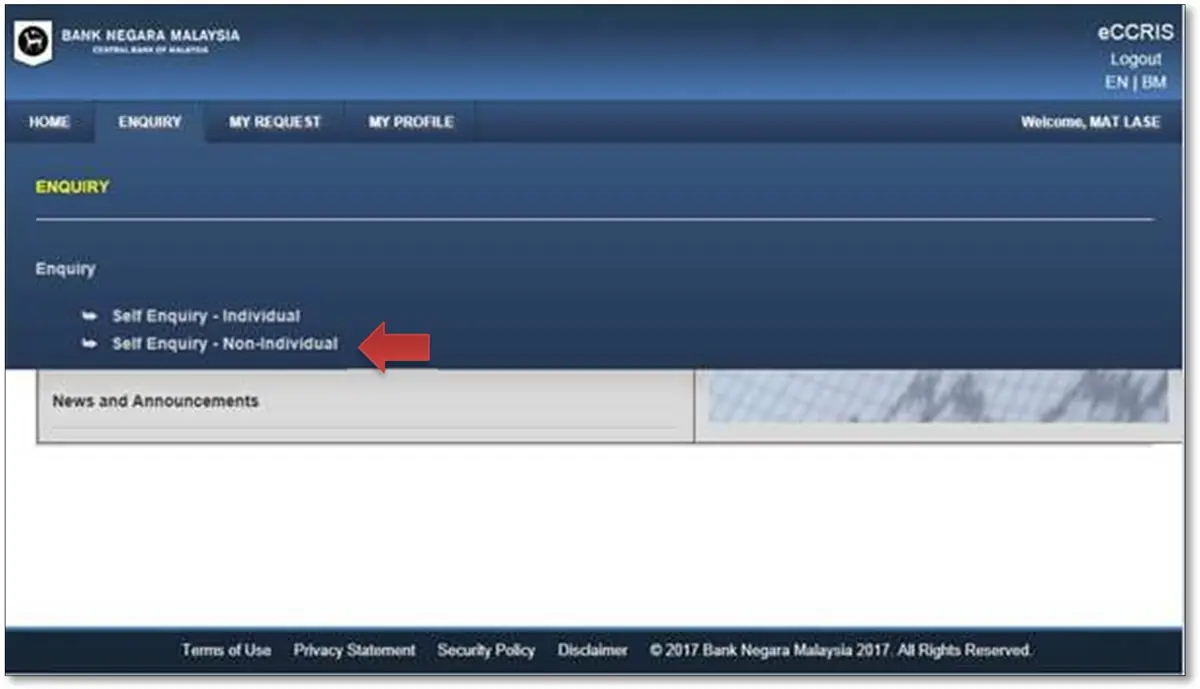
How do I read the CCRIS report? I wish to obtain further clarification on some entries in my CCRIS report. Can BNM assist me?
Further information on how to read the CCRIS report can be obtained at: www.bnm.gov.my/ccris. Should you require further clarification on the entries made regarding financing facilities, please liaise directly with the respective financial institution(s) through their Complaints Unit. The contact details of the Complaints Unit can be obtained via the following links:
www.bnm.gov.my/regulations/fsp-directory
Should you find any wrong/incomplete entries on personal information (name, IC, etc), you may request for verification on personal data in the eCCRIS website. Please refer to Section B (Q8) for details.